
I Suck with Dates — But Home Assistant Never Forgets Garbage Day 🗓️
As an Amazon Associate, Smart Home Labo earns from qualifying purchases. This site contains affiliate links.
I’ll admit it: Remembering birthdays is hard. Meetings? I rely on notifications.
Remembering the garbage schedule?
- Recyclables = Monday
- Burnables = Wednesday & Saturday
→ okay, still within human limits.
But then:
- PET bottles = 1st & 3rd Friday
- Non-recyclables = 2nd & 4th Friday
Nope. Absolutely not. My brain simply refuses to store that information.
So I let Home Assistant remember everything for me.
🧠 Step 1: Create a “Garbage Calendar” Inside Home Assistant
Section titled “🧠 Step 1: Create a “Garbage Calendar” Inside Home Assistant”The hero of this story is the Local Calendar integration. It’s simple, powerful, and best of all: your data stays 100% local.
No Google Calendar. No Apple Calendar. No cloud. Just Home Assistant doing its job.
🔗 Local Calendar documentation
With it, you can create recurring events like:
- “Recyclables — every Monday”
- “Burnables — every Wednesday & Saturday”
- “PET bottles — 1st & 3rd Friday”
- “Non-recyclables — 2nd & 4th Friday”
To set it up:
- Go to Settings → Devices & Services → Add Integration
- Search for Local Calendar
- Name it “ゴミ (Komi)” or simply “Garbage”
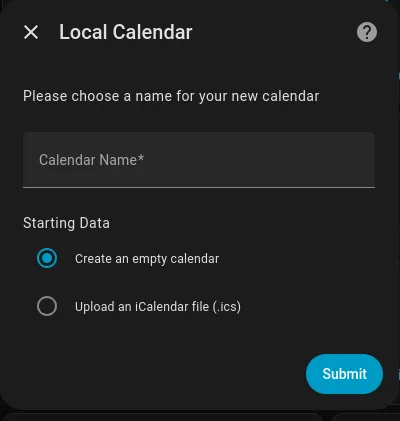
Then:
- Open Calendar in the left sidebar
- Click Add Event
- Configure the repeating events according to your city’s garbage schedule
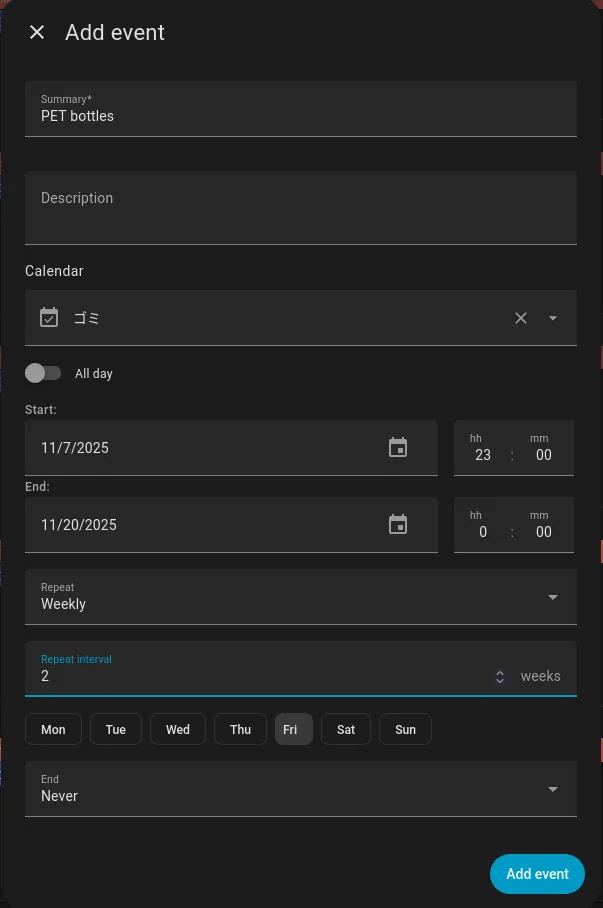
Each event title becomes the notification message. Once this step is done, your garbage schedule is digitized and ready to automate.
🚪 Step 2: Let Home Assistant Know When You Actually Took Out the Trash
Section titled “🚪 Step 2: Let Home Assistant Know When You Actually Took Out the Trash”Home Assistant also needs a way to know that you did take the trash out. Sounds magical, but the setup is simple.
I use a History Stats Helper.
🔗 History Stats Helper documentation
A helper is basically a little tool inside Home Assistant that keeps track of things for you.
History Stats can:
- count how many times a door opened
- track how long a device was on
- measure how many times a sensor was triggered
Perfect for “Did I open the trash cabinet today?”
So here’s what I did:
-
I attached a small door sensor to the cabinet where I store my garbage bags.
-
I created a helper via: Settings → Devices & Services → Helpers → Add Helper → History Stats
-
I set it to Count how many times that sensor opens per day.
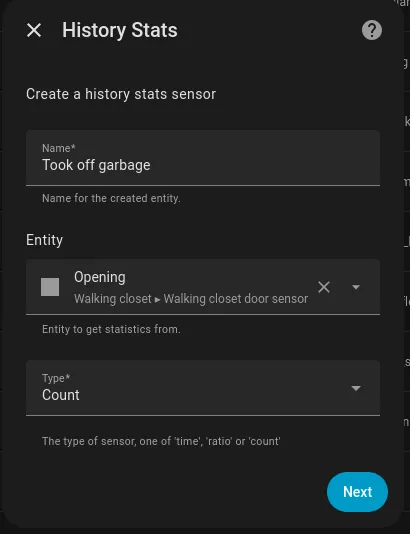
-
On the next page, I set the state to Open
-
On the next page I set Start to
{{ today_at('20:00') }}and End to{{ today_at('23:59') }}(to count only during that period)
So if the counter goes above 1 during the evening, Home Assistant knows:
“He opened the trash cabinet. Mission accomplished.”
This avoids endless reminders — and keeps the system smart, not annoying.
🔔 Step 3: Smart Notifications That Don’t Annoy You
Section titled “🔔 Step 3: Smart Notifications That Don’t Annoy You”The automation triggers exactly 4 hours before the garbage collection event. So if tomorrow morning the city collects burnables, Home Assistant starts reminding me at 20:00 the night before.
To avoid spam:
Notifications only appear if:
Section titled “Notifications only appear if:”- I am home
- The time is between 20:00 and 00:00
If I’m away? No notifications. If I’m sleeping? No notifications past midnight.
The automation repeats every 30 minutes until:
✔️ I opened the trash cabinet (History Stats > 1) OR ✔️ It becomes 00:00–01:00 (meaning I missed it… and I’ll accept my defeat)
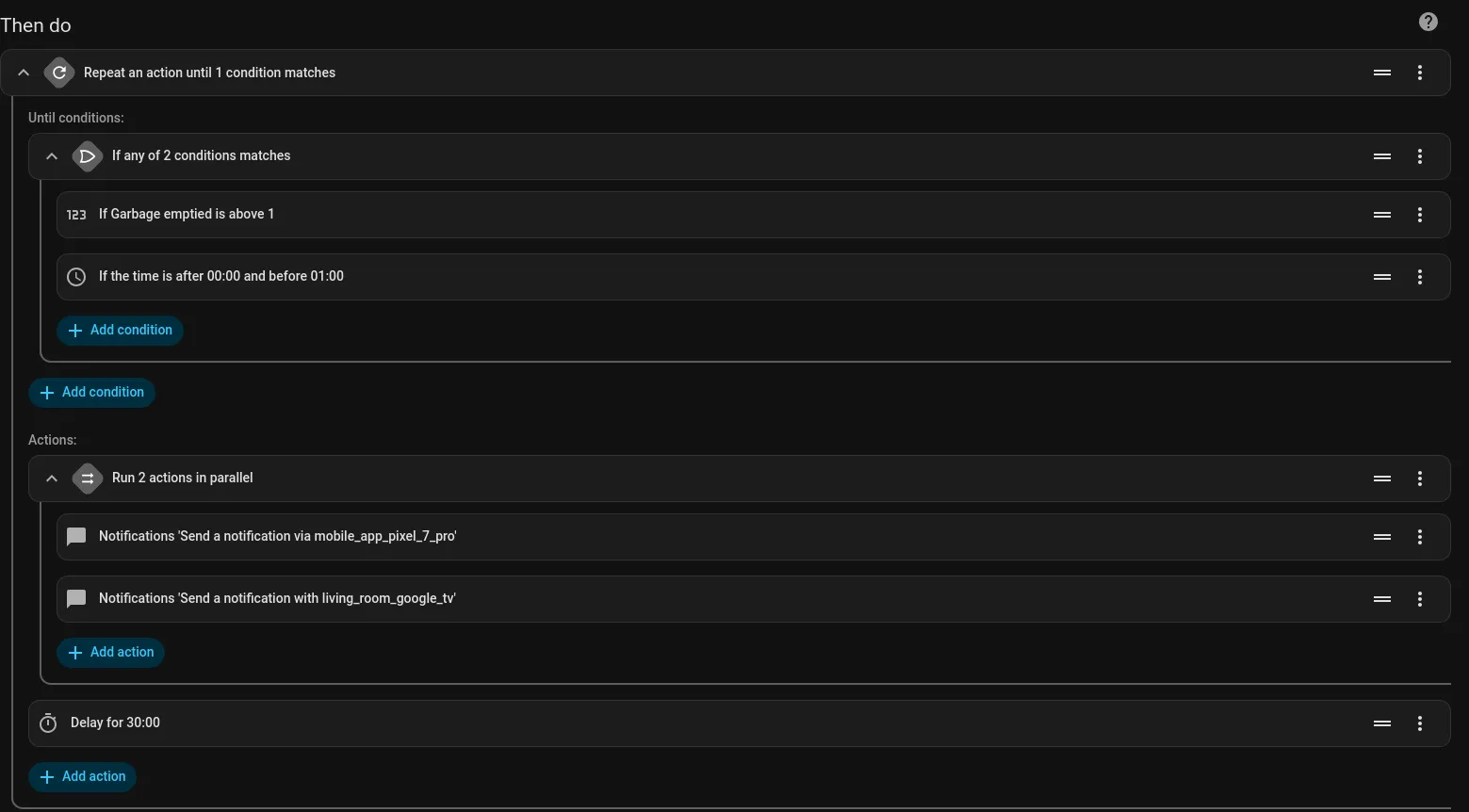
This keeps reminders helpful, not nagging.
📍 Where Do Notifications Appear?
Section titled “📍 Where Do Notifications Appear?”Anywhere I want — and that’s the beauty of Home Assistant.
📱 1. Home Assistant Companion App (Android & iOS)
Section titled “📱 1. Home Assistant Companion App (Android & iOS)”The fastest and easiest option. Install the app, enable notifications, done.
🔗 Home Assistant Companion App
You’ll get a notification like:
“PET Bottles”
Clear and straightforward.
📺 2. Google TV / Fire TV
Section titled “📺 2. Google TV / Fire TV”Yes — your TV can warn you before garbage day too.
By installing a dedicated app on your Google TV or Fire TV, you can receive big, visible pop-up messages. Perfect if you tend to ignore your phone while watching YouTube.
🔗 Notifications for Android TV / Fire TV
Super useful if your TV is your “evening command center.”
🏠 Why This Automation Is Actually Life-Changing
Section titled “🏠 Why This Automation Is Actually Life-Changing”Let’s be honest:
Remembering one or two garbage schedules per week? Fine.
Remembering four different types, including:
- alternating Fridays
- mixed patterns
- and city-specific rules
…is a skill very few humans possess.
This automation saves me:
🧠 mental load 📅 calendar checking 🤯 “Wait, is it 1st Friday or 2nd Friday?” confusion 🕗 running outside at 7 AM in panic
It:
- removes a weekly burden
- works silently
- notifies me at the right moment
- knows when I took the trash out
- stops by itself
- requires zero maintenance
Smart homes aren’t about fancy colorful lights. They’re about removing stress from everyday life.